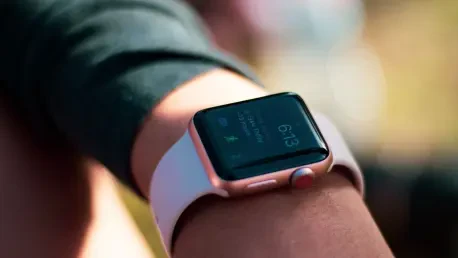

Apple Watches serve as discreet health monitoring tools that allow older adults to maintain their independence without the social stigma often associated with traditional medical alert pendants. In the current landscape of 2026, the integration of wearable technology into daily life has moved beyond simple fitness tracking to become a cornerstone of preventive geriatric care. By utilizing sophisticated sensors and intuitive software, these devices provide a safety net that remains invisible to the casual observer, allowing seniors to participate fully in social activities while ensuring that help is never more than a gesture away. The shift toward digital health platforms reflects a broader cultural change where technology empowers individuals to take ownership of their biological data. This proactive stance on health management not only alleviates the anxiety of family members but also fosters a sense of agency among older generations. As the technology continues to mature, it bridges the gap between traditional clinical settings and the comfort of one’s home environment.
1. Activating Emergency SOS and Motion Sensors
The emergency features of the Apple Watch function as the primary lifeline for users who find themselves in immediate physical distress or dangerous environments. By providing a direct link to emergency services, the watch eliminates the need to fumble with a phone during a critical moment. This capability is particularly vital for those living alone, as it ensures that assistance can be summoned regardless of the user’s proximity to a landline or a handheld device. Modern cellular integrations in 2026 allow the watch to operate independently, meaning that even a walk in a local park remains safe. Beyond just placing a call, the system leverages high-precision GPS to relay the user’s exact coordinates to dispatchers, significantly reducing response times in sprawling outdoor areas or large residential complexes. The psychological peace of mind offered by this constant connectivity cannot be overstated, as it reinforces the confidence necessary to lead an active and autonomous lifestyle.
To configure these protections, one must first activate emergency calling by opening the Watch app on a paired iPhone, selecting the Emergency SOS menu, and switching on the option to hold the side button to dial. This physical trigger is designed to be intuitive even under high stress. Simultaneously, creating a comprehensive Medical ID is essential for informing first responders of any underlying conditions. Within the Health app, users should navigate to their profile icon and select Medical ID to input specific details regarding allergies, current medications, and blood type. Adding trusted emergency contacts in this same section ensures that family members are automatically alerted with a text message and location update immediately after an emergency call concludes. For physical safety, navigate to Settings on the Apple Watch, select SOS, then toggle Fall Detection to On and choose Always On. Furthermore, in the Emergency SOS menu on the iPhone, ensure the Call After Serious Crash toggle is in the On position.
2. Monitoring Cardiovascular Health and Medication Schedules
Cardiovascular health and medication adherence are two of the most significant factors in maintaining long-term wellness and preventing hospitalizations. The Apple Watch utilizes photoplethysmography to track heart rate throughout the day, looking for patterns that might indicate hidden issues like atrial fibrillation. This condition, often asymptomatic, can significantly increase the risk of stroke if left untreated. By providing irregular rhythm notifications, the watch acts as an early warning system, prompting users to seek professional consultation before a minor irregularity becomes a major health crisis. Parallel to heart monitoring, maintaining a strict medication regimen is facilitated through integrated digital reminders. Rather than relying on memory or bulky pill organizers, the system offers discreet haptic prompts that remind the user exactly when a dose is due. This reduction in mental load allows seniors to focus on their activities without the constant worry of missing a vital dose.
Activating these health tools requires setting specific parameters within the device software. On the watch, navigate to Settings and then Heart to configure heart rate limits, such as thresholds for alerts if the heart rate stays above 120 beats per minute or drops below 40 while at rest. To enable ECG and irregular rhythm alerts, follow the prompts in the iPhone Health app under the Heart category to activate atrial fibrillation notifications. For prescription management, open the Health app on the iPhone, go to the Browse tab, and select Medications. Tap Add Medication to search for a drug or scan the label, then follow the instructions to establish a routine including the exact time and frequency for each dose. Once configured, the watch will provide a gentle tap on the wrist at the scheduled time. This comprehensive approach to monitoring transforms the wearable into a clinical-grade station, ensuring that any deviations from baseline health are flagged immediately for professional review.
3. Enhancing Environmental Safety and Sound Recognition
Age-related sensory changes, particularly hearing loss, can sometimes lead to safety risks such as missing a doorbell or failing to hear a smoke alarm in a distant room. The Apple Watch addresses this through its Sound Recognition feature, which uses the device’s microphones to identify specific environmental noises. When a recognized sound occurs, the watch provides a clear notification and a vibration, alerting the wearer to events that they might otherwise miss. This technology is a critical safety tool that keeps individuals connected to their physical surroundings. In 2026, the artificial intelligence powering these sensors has become highly sophisticated, capable of filtering out background noise to focus on sounds that truly matter. This allows seniors to remain fully engaged with their environment, whether they are watching television or resting in a quiet corner of the house. The ability to “see” sounds through haptic feedback provides an essential sensory bridge.
Implementing sound recognition starts by opening the Settings menu on the iPhone and navigating to the Accessibility section to select Sound Recognition. After toggling the feature to the On position, users can choose from a variety of specific sounds and choose which ones the watch should monitor, such as smoke alarms, running water, or a doorbell. When the watch identifies one of these acoustic patterns, it will send a haptic alert and a descriptive notification to the wrist. This ensures that the user is immediately aware of potential hazards or visitors without needing to keep their ears strained at all times. For those with hearing difficulties, this digital assistance provides a renewed sense of security and awareness within the home. By customizing these alerts to fit a specific living situation, seniors can ensure they never miss an important auditory cue. This tool, combined with the ability to adjust font sizes in the Control Center under the AA icon, makes the device usable for varied sensory needs.
A Strategic Path Toward Integrated Senior Wellness
The implementation of these health alerts establishes a robust framework for personal safety and proactive medical management. By configuring the Apple Watch as a dedicated health assistant, many seniors successfully navigated the transition toward more tech-integrated lifestyles while retaining their autonomy. The choice to adopt these digital tools proved to be a pivotal step in reducing the frequency of undetected medical emergencies and improving the accuracy of cardiovascular data shared with clinical teams. Moving forward, the most effective strategy for any user was to treat the device as a collaborative partner in their wellness journey. Regularly reviewing these settings and ensuring that software updates were applied helped maintain the reliability of the sensors. As wearable technology continued to evolve, the initial setup of these alerts provided the foundational security necessary for a confident and independent life. Embracing these actionable steps allowed for a safer, more connected experience in an increasingly digital world.